
AI-generated images often contain hidden metadata known as Content Credentials or CR tags. Here's what they are, why creators care about them, and how to remove them safely.
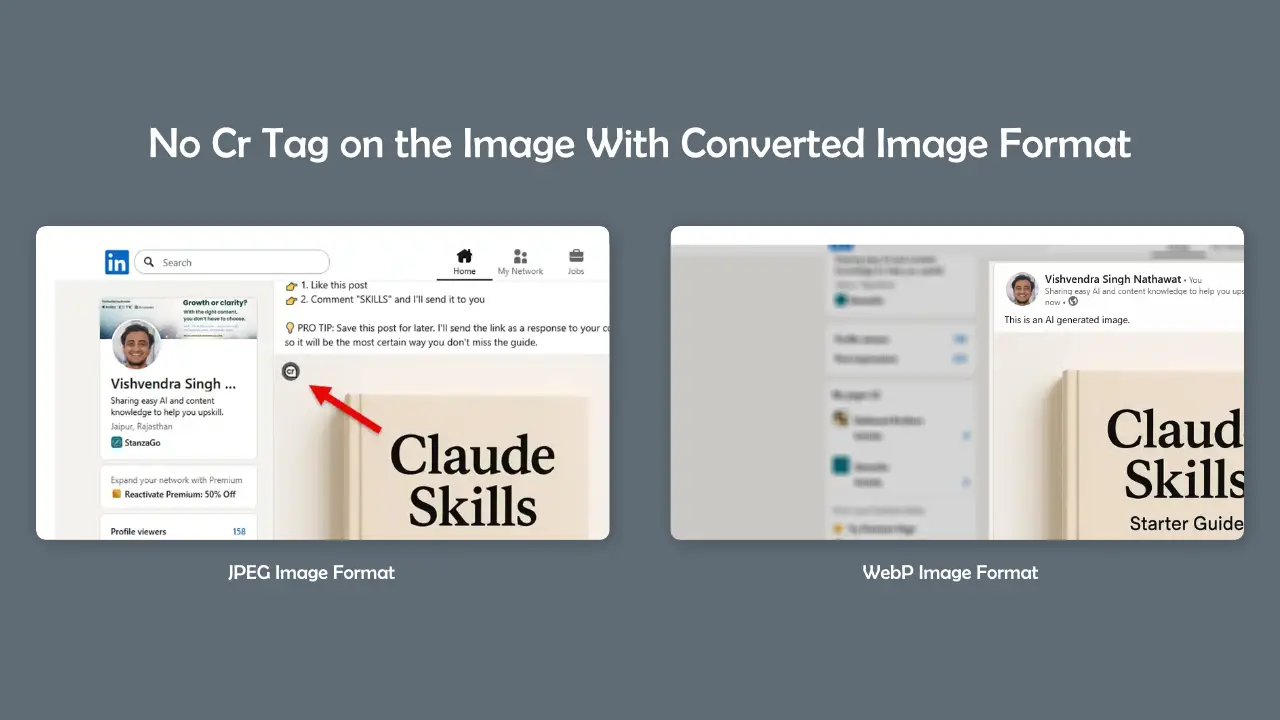
AI image generators have made it easier than ever to create professional-looking visuals for LinkedIn, blogs, websites, presentations, advertisements, and social media campaigns. However, many users don't realize that some AI-generated images contain hidden metadata called Content Credentials, commonly referred to as the CR tag. This metadata can reveal that an image was generated or modified using AI tools.
For creators, marketers, agencies, founders, and professionals who regularly publish visual content, understanding how Content Credentials work has become increasingly important. While transparency is valuable, some users prefer greater control over the metadata attached to their images before sharing them online.
# What Is a CR Tag?
CR stands for Content Credentials. It is a type of metadata embedded within an image file that can contain information about how the image was created, edited, or generated. Several AI image platforms and editing tools have started implementing these credentials to improve transparency regarding AI-generated content.
Unlike visible watermarks, Content Credentials are typically hidden inside the image file itself. Most users will never see them unless they inspect the file using metadata analysis tools.
# Why Do AI Images Include Content Credentials?
- Improve transparency around AI-generated content
- Track image creation history
- Help platforms identify AI-generated media
- Support digital authenticity initiatives
- Provide information about editing workflows
Technology companies and industry organizations have promoted Content Credentials as a way to provide context about how digital content was created. While the concept aims to improve transparency, not every creator wants this information attached to every image they publish.
# Why Some Professionals Remove CR Tags
Many professionals use AI as just one step in their creative workflow. A marketing team may generate an initial concept with AI, then spend hours editing, redesigning, retouching, and customizing the image. In such cases, they may prefer not to distribute unnecessary metadata alongside the final file.
- Cleaner image files
- Reduced metadata footprint
- Improved privacy
- Consistent branding workflows
- Simplified asset management
- Professional content distribution
# How Content Credentials Affect LinkedIn and Social Media
Many creators use AI-generated visuals for LinkedIn posts, startup announcements, blog thumbnails, educational content, and marketing campaigns. While most social media users will never inspect image metadata, some creators prefer maintaining control over the information attached to their published assets.
"The image you share should represent your work. Metadata should be a choice, not a surprise."
# How to Remove Content Credentials Metadata
Removing Content Credentials typically involves stripping metadata from the image file while preserving image quality. This process removes embedded information that may reveal creation history, AI generation details, editing records, or other attached metadata.
Instead of installing complex software, many users prefer browser-based metadata removal tools that can process images instantly without requiring technical knowledge.
# Using Paperxify AI Metadata Remover
Paperxify offers a simple AI Metadata Remover designed to help users remove embedded metadata from image files quickly and efficiently.
- Remove Content Credentials metadata
- Remove AI generation metadata
- Remove EXIF information
- Preserve image quality
- No software installation required
- Fast browser-based processing
Tool URL: https://paperxify.com/tools/ai-metadata-remover
# Content Credentials vs Traditional Metadata

| Metadata Type | Purpose | Common Example |
|---|---|---|
| EXIF | Camera information | Camera model, lens, GPS |
| IPTC | Publishing information | Author, copyright |
| XMP | Editing history | Software and edits |
| Content Credentials | AI and creation history | AI generation details |
# Best Practices for AI Image Publishing
- Review image metadata before publishing
- Optimize image size for web performance
- Use descriptive file names
- Maintain original source backups
- Check privacy-sensitive metadata
- Use metadata removal tools when appropriate
# Final Thoughts
As AI-generated content becomes increasingly common, understanding Content Credentials and image metadata is becoming an important part of digital publishing. Whether you're a founder sharing LinkedIn posts, a marketer running campaigns, a blogger creating thumbnails, or a designer producing creative assets, knowing what information is attached to your files helps you stay in control of your content.
If you want to remove Content Credentials, AI metadata, or other embedded image information before publishing, Paperxify's AI Metadata Remover provides a simple and efficient solution.
Try it here: https://paperxify.com/tools/ai-metadata-remover
Written by Admin
Chief Editor
Expert contributor at Paperxify. Sharing insights on engineering, AI systems, and student success.